 UniCredit
Same spec. A very different first call.
We took the two Swagger files behind UniCredit's TPP Onboarding catalogue entries (the first API every TPP meets), merged them into one OpenAPI file and ran it through APIMatic. Everything below came out of the box: a branded portal with both environments, SDKs in three languages, guides in the navigation, and docs that AI assistants and coding agents can read.
SDKs offered on the page: C#, Python, TypeScript
Pages to read for one operation: Production and Sandbox in one reference
Guides: onboarding flow, headers and request signing
AI touchpoints: llms.txt, Markdown, ChatGPT, Claude, Cursor, Context Plugin
Drag to compare
Each pair shows the same content in both portals, captured at the same size. Today's screenshots were taken signed in, as a newly registered TPP. Drag the handle, use the arrow keys, or click a preset.
Today
With APIMatic
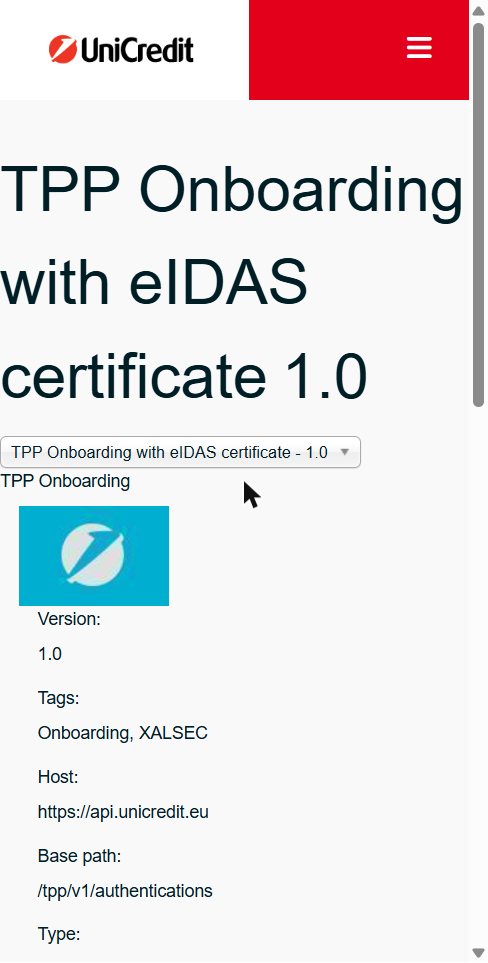
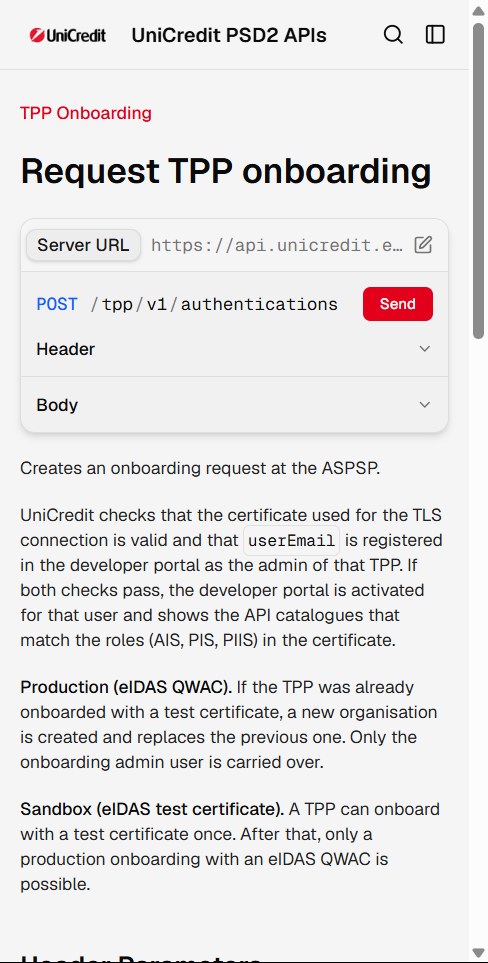
Same API at 390 px wide
Today the API title and its metadata block (version, tags, host, base path, type) fill the whole first screen, and the endpoint itself is several scrolls down. APIMatic opens on the operation, with a menu for the rest.
What you get that has no "before"
The current API page has nothing equivalent to these. All of them are generated from the same spec and stay in sync each time it changes. Click a card to enlarge it.
A developer and a coding agent, one task
The person writing the integration is now often an AI coding assistant working next to a developer. Here is the same task on each side: what the assistant can find, and the code that comes out.
Today
- The docs are behind a login. The agent can't open the API page, and the public
/llms.txt,/openapi.jsonand/sitemap.xmleach return the portal's home page with HTTP 200, so the agent can mistake HTML for content. - The developer downloads two Swagger 2.0 files for one operation: one per host, with different content.
- The production file types the body as
string, so a client generated from it takes raw text. The sandbox file has the rightOnBoardingRequestschema. - The operationIds don't survive code generation cleanly.
requestOnBordingcarries its typo into every method name, andTPP OnBoarding Servicehas spaces, so each generator renames it its own way. - Errors have no schema, so 400 and 401 handling is guesswork.
// what gets written by hand today (illustrative)
const agent = new https.Agent({ cert, key });
const host = env === "prod"
  ? "https://api.unicredit.eu"
  : "https://api-sandbox.unicredit.eu";
const res = await fetch(host + "/tpp/v1/authentications", {
  method: "POST", agent,
  headers: { "Content-Type": "application/json",
             "X-Request-ID": randomUUID() },
  body: JSON.stringify({ userEmail }),
});
if (!res.ok) { /* 400? 401? no error shape */ }
With APIMatic
- One command installs the Context Plugin for Claude Code, Cursor or Codex. It ships the SDK with an SDK map: exact signatures, fields and error variants the agent can look up.
- One typed call, two environments. Both hosts are built into the SDK as server environments, so moving to production is a one-line change.
- Typed request and response.
body: { userEmail }is checked at compile time againstOnboardingRequest. - Typed errors with a discriminated
err.payload.kind, and a non-throwing.asApiResult()form. - mTLS stays in your HTTP client. Each SDK accepts a custom client (TypeScript
fetch, Pythoncustom_http_client, C#HttpClient) that carries the certificate.
// adapted from the generated TypeScript SDK's API reference
const client = new UniCreditTppOnboardingApiClient({
  serverEnvironment: ServerEnvironment.Environment2, // sandbox host
  fetch: mtlsFetch, // carries the eIDAS test certificate
});

const res = await client.requestOnboarding({
  xRequestId: randomUUID(),
  body: { userEmail: "admin@example-tpp.com" },
});
// res: OnboardingResponse · errors: RequestOnboardingError
Can an AI read the docs and use the API?
Two kinds of AI touch an API: assistants answering questions about the docs (runtime) and coding agents writing integrations (build time). The ladder shows where each portal sits.
Nothing readable
Docs behind login; AI paths return HTML
Public spec
A spec file a tool can fetch
LLM-ready docs
llms.txt and Markdown pages
Assistant hand-off
Open a page in ChatGPT or Claude
Agent-ready SDK
Context Plugin + SDK map
Agent tools
MCP server over the API
| Touchpoint | Today (developer.unicredit.eu) | APIMatic portal |
|---|---|---|
| Runtime: assistants reading the docs | ||
llms.txt | ✕Returns the home page HTML with status 200 | ✓/llms.txt lists every guide and reference page |
| Page as Markdown | ✕None; the reference is a client-side Swagger UI widget | ✓Copy as Markdown on every page |
| Open in an assistant | ✕None | ✓Open in ChatGPT, Claude or Cursor with the page already loaded |
| Readable without signing in | ✕The API pages are visible only after sign-up, and anonymous visitors get "The requested API can not be loaded" | ~Public in this PoC. Access control is a deployment choice |
| Build time: agents writing the integration | ||
| Spec quality for codegen | ✕Body typed as string, operationId with spaces, two diverging files | ✓One validated OpenAPI 3 file, typed body, one clean operationId |
| SDK an agent can use | ✕None on the page. The API metadata lists Axway-generated iOS, Android and Node.js SDKs, but no link to them is shown | ✓C#, Python and TypeScript SDKs, each with a README, API reference and SDK map |
| Coding-assistant plugin | ✕None | ✓Context Plugin for Claude Code, Cursor and Codex, downloadable from the portal |
| Agent tools | ||
| MCP server | ✕None found | ~Not part of this PoC. The same spec is the input; a next-step conversation |
DX scorecard
Where today's portal already does something well, we say so. The UniCredit brand is applied consistently, and the onboarding description itself is clear.
| Capability | Today (Axway portal, Swagger UI) | APIMatic portal |
|---|---|---|
| Branding | ✓UniCredit header, red and logo | ✓UniCredit logo, red and favicon, in light and dark modes |
| Environments | ✕Two catalogue entries and two pages for one operation, one per host | ✓One reference with a Production / Sandbox switch, built into the SDKs |
| Structure | ✕Everything under a default group; the path is shown as / | ✓A "TPP Onboarding" group and the full path /tpp/v1/authentications |
| Request body | ✕Production page shows the body as string, with example "string" | ✓OnboardingRequest with userEmail and a realistic example |
| Errors | ✕400 / 401 / 404 / 500 labelled only by status name | ~Each status explained in words. No error body yet, because the source defines none |
| Guides | ~A public Getting Started page, separate from the API page | ✓Onboarding flow, and Headers and request signing, in the sidebar and in search |
| Code samples | ✕None | ✓cURL plus idiomatic C#, Python and TypeScript SDK calls |
| SDKs | ✕None offered on the page | ✓C#, Python and TypeScript with typed models and typed errors, as downloads |
| Try it | ✕Inline "Try it out" is turned off (enableInlineTryIt: false) | ~Playground with server switch. mTLS calls still need the TPP's own client |
| Spec download | ✓Swagger 2.0 download, after sign-in | ✓OpenAPI download from the reference |
| Search | ✕None on the API page | ✓Ctrl K across guides, reference and SDK docs |
| Mobile | ✕Title and metadata fill the first screen | ✓Responsive layout that opens on the content |
| AI readiness | ✕None (see AI interface) | ✓llms.txt, Markdown, Open in ChatGPT, Claude or Cursor, Context Plugin |
The same pipeline, across the whole catalogue
The PoC covers the two APIs a new TPP can see. The public catalogue lists far more, all built on the Berlin Group NextGenPSD2 standard, so they share most of their structure.
Catalogue entries in the public API catalogue: AIS, PIS, PIIS, consents, standing orders, bulk payments and signing baskets
Banks in the country filter, from UniCredit S.p.A. and HypoVereinsbank to Bulbank and Zagrebačka banka, each with its own set of entries
Spec formats side by side: 68 entries are OpenAPI 3.0 and 8 are still Swagger 2.0, including both onboarding APIs
One more finding from the public catalogue: the six UniCredit Bank Serbia JSC Belgrade entries (AIS, AIS Consent, PIS, PIS Standing Order, PIIS, PIIS Consent) all link to the same API ID, so all six open the same API. With docs generated from specs in source control, every link comes from the spec itself.
Try it live
The APIMatic portal is embedded below. Today's API pages need a signed-in TPP account, so they can't be embedded here. Use the screenshots above, or sign in at developer.unicredit.eu.
One spec file and a few small cleanups
No custom front-end work. Every fix went into the OpenAPI file, so UniCredit keeps them whichever tool renders the docs.
- The two Swagger 2.0 files merged into one OpenAPI 3.0 file with Production and Sandbox servers
- The production body changed from
stringto theOnboardingRequestschema - One clean operationId,
requestOnboarding, a short summary and a named tag - Examples for the body, the response and
X-Request-ID, and descriptions for each error status - Two guide pages written from the public Getting Started page, plus the UniCredit logo and red